Akhirnya alexa update juga neh tanggal 9 februari kemaren, malam kemaren sebenarnya udah cek-cek di alexa sendiri tapi kayanya masih belum kelar tuh updatenya, tapi sekarang wuuuiiih udah nyampe di bawah 1 juta.hore10000x
Perjalanan blog ini udah lumayan dari sempat pending selama 5-6 bulan buat ngerjain skripsi dan terbengkalai.
Tahapan pertama: biasa awal bikin blog cuma dapat alexanya blogger yaitu 9
Tahapan selanjutnya : mulai dapat alexa yang 18 jutaan ,,lumayan lah
Tahapan berikutnya: udah nyampe 2 jutaan ,,ikutan sponsored review keterima tapi ga
dapat job-job juga akhirnya mengundurkan diri dan belajar membenahi blog agar lebih baik
Tahapan sekarang: akhirnya mencapai di bawah 1 jutaan, alhamdulillah tidak sia-sia belajar untuk memperbaiki diri (bisa lihat di sidebar saya)
Sekarang juga masih fokus ke content agar tetap konsisten 1 hari satu postingan dan target alexa ntar di bawah 300 ratusan lah. Amin
Tambahan saja:
1. kalau alexa itu makin kecil makin bagus soalnya ada teman saya yang bilang "ko alexa saya turun seh". Yups beda sama PR google, alexa sebaliknya dari besar ke kecil.
2. Alexa sebenarnya menurut pengetahuan saya sebagai pembanding antar situs saja, masih bagusan kalo PR google tinggi.he3x (tapi kalo mo maen paid review siapkan alexa anda usahakan di bawah 1 jutaan walaupun tidak wajib, karena makin bagus PR ma alexa makin besar kemungkinan dapat job)
Sekian dulu deh,,semoga sukses dan blognya makin bagus (terutama yg komentar di sini dan masang link saya.ho3x)
Saya bingung harus memulai darimana tetapi daripada berbasa-basi ria mending kita langsung ke pokok masalahnya. Kemaren ada teman saya yang nanya di blog sebelah bagaimana caranya memasukkan powerpoint ke dalam blog????
Selamat, anda telah tepat datang ke blog ini dan saya ingin berbagi pengetahuan dengan teman-teman semua.he3x cara mudahnya memasang powerpoint atau bahkan word dan sejenisnya bisa melalui scribd.com
Ini adalah sebuah situs yang menyediakan tempat untuk kita upload, baca-baca dokumen dan dowload juga. Ada berbagai macam dokumen disini yang bisa dilihat dan di download.
Untuk kebebasan mengakses segala macam dokumen kita harus daftar dulu. Jadi silahkan klik disini.
Sekarang cara memasang dokumen baik itu power point, word atau pdf di blog.
Setelah login di scribd, maka anda akan masuk ke member area.
Klik pada Tulisan Upload
Masukkan dokumen yg anda ingin upload
Setelah selesai proses upload truz deskripsikan dokumen anda (title, category, tags dll)
nanti akan muncul Share Your Document, pilih dokumen anda dan copy “embed code”
Tinggal paste di blog anda, mo di post boleh, mo di sidebar juga boleh,tinggal atur lebar dan tingginya aja.
Selesai
Nah itu dia Scribd yg akan memberikan kemudahan dalam sharing dokumen anda. Mo liat contohnya di bawah ini Selamat menikmati deh,,makasih
Blog Widgets Widgets are a handy, easy and simple way to add some flare to your blog. Whether you’d like to display the number of currently online visitors to your site or simply the weather report for Los Angeles, you can do it with widgets. We’ve assembled a list of 50 useful or simply cool widgets for your pleasure. And remember, the first rule of widgetizing your blog is - don;t overdo it
1. MyBlogLog’s Recent Readers - this widget can easily be called a hit amongst blog owners; its popularity even managed to convince Yahoo into buying MyBlogLog. The widget lets you see the avatars of recent visitors to your blog, provided they’re also members of MyBlogLog.
2. Mashable - get the latest social networking news from this very site.
4. Preview Anywhere - see a live preview of outgoing links in a small popup which activates on mouseover. Some find this annoying, while others might find it useful
5. Twitter Badge - if your life is so interesting that everyone must know what you’re up to all the time, then a Twitter badge is the ideal counterpart to your blog. It’ll proudly displays your recent tweets.
6. Digg News - display the latest Digg links on your blog. Themeable and fully customizable.
7. FEEDJIT - real time traffic data directly in your blog’s sidebar. 8. LineBuzz - inline comments for your blog. Very handy for blogs with frequent lively discussions.
9. Flixn - display a stream directly from your webcam, so your blog visitors can always see what you’re up to.
10. 3Jam - lets your visitors send messages to your mobile phone, without them knowing your phone number.
11. Jaxtr - with Jaxtr, your visitors can actually call you to your mobile phone; again, your number stays private.
12. LinkedInABox - show off your LinkedIn profile. Perfect for personal blogs.
13. Box Widget - enable visitors to use box.net’s online storage directly on your web site.
14. Price of gas - displaying gas prices on your blog might seem unnecessary to some, but it’s cool if you have a traffic/travel related blog.
15 iBegin Weather Widget - Display weather information in your sidebar. Just like with Price of Gas, works great with travel-related blogs.
16. ClockLink - display time in various time zones with these nifty Flash clocks.
17. Film Loops - display the latest loops from your FilmLoops account.
18. Daily Painters - display paintings from famous painters on your blog.
19. WhoLinked - show your visitors which sites have recently linked to your web site. Works with all major blog platforms.
20. Criteo AutoRoll - displays links to blogs similar to your blog.
21. Bitty Browser - embed a cute, fully functional mini web browser to your blog.
22. Leafletter - create a mini website and embed it into your blog.
23. WikiSeek - search Wikipedia with this simple widget.
24. FeedCount - show off the number of visitors to your blog with this handy little button.
25. Technorati Link Count - display the number of links your website has from one of the biggest blog authorities - Technorati.
26 MyPageRank - another good way to show how “big” your blog is is to show off your Google PageRank.
27. CheckPageRank - in addition to showing your PageRank, this widget also shows your Alexa ranking.
28. BlinkxIt - embed a link to related videos directly into your website.
29. Skype button - display your Skype online/offline status on your blog.
30. RockYou Horoscope - not something I would personally use, but some people are into horoscope. Hell, most people are into horoscope. Anyway, this widget shows horoscope (doh!) and does it in a nicely designed colorful box.
31. del.icio.us Tagometer - display how many times have del.icio.us users saved your page.
32. del.icio.us Linkrolls - this badge shows your latest bookmarks from del.icio.us.
33. Timelines - need to create a timeline? Seek no further. This widget makes it really easy.
34. PollDaddy - PollDaddy lets you create beautiful polls in no time, and display them at your blog.
35. Vizu - another poll-making widget, compatible with all major blog platforms.
36. AnswerTips - display definitions from Answers.com for various terms on your blog. The definitions are shown in bubbles which are activated on doubleclick.
37. AnswerBoxes - give your visitors a chance to enter a term themselves, and get a definition from Answers.com
38. Now Playing - if you got to share your current playlist contents with the world, Sigamp will do the trick. Works with most popular music players, including Foobar, Winamp, iTunes and others.
39. BuzzBoost - display headlines from your RSS feed on any website.
40. LibraryThing - show off the latest books you’ve been reading.
41. Plaxo Address Book - let your most faithful visitors access their address books direclty from your site.
42. AuctionAds - a widget that displays auctioned items on eBay, and gives you a percentage of the price paid when sometimes buys an item.
43. aStore - similar to AuctionAds, only for Amazon. Create a mini-store on your site and receive profit when someone buys an item through your store.
44. Plazes - show your current location on a Plazes map.
45. Stockalicious - track your portfolio with this widget, and share it with others. Let everyone know how much money you’ve lost.
46. Yahoo! For Good - create a charity badge and ask for donations for a worthy cause.
47. Giftspace - your friends never know what to buy you for birthday? Let them know what you really want with this nifty widget.
48. MixMap - see where are the visitors to your MySpace profile from on a map.
49. Google Map Widget - display a searchable Google Map on your website.
50. Google Video Search - add a video search form and selected videos to your web site.
51. Odeo player - display an Odeo player for and podcast right there in your sidebar.
Guna dari RSS Feed adalah untuk tujuan sindikasi kandungan situs, berita yang ada di situs/blog, dll Sindikasi di sini maksudnya, sebuah situs yg memiliki RSS Feed dapat kita baca isinya tanpa harus datang ke website tsb. Contoh, untuk membaca artikel dari indosiar.com, kita tidak perlu datang ke situs tersebut, tapi cukup dg berlangganan RSS Feed indosiar yg dapat kita taruh di situs lain yg menyediakan layanan RSS Feed aggregator atau RSS Feed Reader secara gratis.
Di RSS Aggregator atau Reader ini bisa kita kumpulkan seluruh RSS Feed situs terkenal dan kita dapat membaca semuanya dalam satu halaman. Misalnya, Anda dapat membaca, Indosiar , Media Indonesia,dll dari http://reader.google.com saja.
Caranya?
RSS FEED AGGREGATOR atau READER Pemberi layanan gratis RSS Feed aggregator atau Reader yg terkenal ada dua yaitu Yahoo! di http://my.yahoo.com dan Google di http://reader.google.com
A . YAHOO! RSS Aggregator 1. Buka http://my.yahoo.com dg id & password yahoo email Anda.
2. Klik 'Continue to My Yahoo!'
3. Ada dua kolom kiri dan kanan. Semua kolom tsb. bisa Anda delete dg mengklik tanda 'x' atau kalau suka dibiarkan saja.
4. Lihat di bagian paling bawah ada menu 'Add Content' --> klik
5. Di sebelah kanan kotak 'Find Content' ada menu 'Add RSS by URL' --> klik
6. Masukkan RSS Feed dari Indosiar berikut di kotak yg tersedia: http://news.indosiar.com/rss
7. Klik 'Add'
8. Klik 'Add to My Yahoo' (warna kuning).
Selesai.
Apabila Anda ingin menambah RSS feed dari koran atau media lain Anda cukup lakukan hal serupa secara berulang-ulang.
GOOGLE ! RSS aggregator
1. klik disini untuk menuju google reader
2. Silahkan login dengan username & password milik sobat (kalo belum punya account google, klik disini)
3.Klik tulisan Add subscription yang berada di sebelah kiri monitor anda
4. Masukan alamat feed yang mau di baca, misalnya blog saya : http://riezeablog.blogspot.com/atom.xml atau untuk koran media Indonesia seperti ini : http://www.mediaindo.co.id/promo/rss.asp
5. Klik tombol Add, tunggu beberapa saat sampai proses selesai
6 Feed sudah tersedia untuk di baca.
Selesai.
Untuk memasukan beberapa alamat feed lainya, ulangi dari yang langkah ke 3 sampai akhir.,
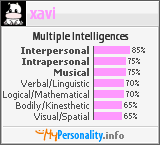
Sudahkah anda tahu tentang personality anda? bagaimana hubungan personal anda dengan orang lain atau bahkan diri anda sendiri? Yups,,kita bisa mengukurnya dengan bantuan widget dari mypersonality.info. disini anda bisa menemukan dan mengerti tentang aspek yang berbeda dalam diri anda dengan mengambil beberapa test disini. Ada dua test yang bisa di ambil yaitu - personality types - multiple intellegences
Dengan menjawab pertanyaan-pertanyaan yang diajukan maka hasil yang akan ditampilkan akan sesuai dengan personality dan intelegensi kita, dan hasilnya bisa kita masukkan ke dalam blog kita.
contohnya bisa anda lihat di bawah ini
jadi cukup sign up dan mengambil test yang diajukan..Tentunya merupakan widget yang bagus. selamat mencoba
Generally if we visit other blog, we leave our track with give comment in shoutbox or comment box, and now have added one again is via mybloglog. ( for which not yet known the way to get mybloglog may click here). Perhaps You have attached photo in profile account mybloglog your face will really appear in other blog who also member of mybloglog and have installed" Recent Readers" in her/his blog
There are some tips to do so:
1. Communities
a. Before start blogwalking ( visiting the other blog) don't forget for login first in mybloglog then start blogwalking to other member mybloglog. With this way, your face will be appear in blog that you visit. Community generally contain blog from a member. Members is account membership in mybloglog. One member can own more than one blog/community. don't forget to place your photo in mybloglog profile, writing down about yourself at “About Me” and brief word in " community/blog"
b. At the sidebar of your blog , you will see the faces of other blogger who visiting your blog. As paying a visit, don't forget visit back with click right ';open new window [in] each;every visitor name and visit his/her blog. To add more friend and have your face always place at other friends blog, besides paying a visit to Indonesian blogger, don't forget to visit famous blog-blog at other country who used mybloglog, especially if Your blog used English. At dashboard mybloglog after login, click menu " Communities", there is menu " Hot Communities", visiting one ( generally there is 6 hot communities)
Note: not all blog with " Hot Communities" installing " Recent Readers" in her/his blog, you will know after You visit their blog. For blog who install " Recent Readers" you can visit them everytime You logging in mybloglog. Let Your face appears in their blog.
c. Gain relation/link with joining " Community" everytime You pay a visit to Community in mybloglog, just click " join community",. Don’t forget to leave word via " Leave Message" and leave address of your blog. Address of your Blog will automatically become " live link". for example http. follow the example of http://riezeablog.blogspot.com
2. Members
- Click menu MEMBERS., Add Contact ( friend, family, fan ); select;choose one or all option. up to you - For blog who used Indonesian, just add contact member from Indonesia only
INDONESIAN VERSION Biasanya kalau kita "setor muka" di blog lain adalah dg memberi komentar di shoutbox atau di kotak komentar, maka sekarang sudah tambah satu lagi yaitu via mybloglog. (bagi yang belum tahu cara daftar mybloglog bisa klik disini).Tentunya Anda sudah pasang foto di profil account mybloglog, Maka muka anda akan nongol betulan di blog orang yg juga anggota mybloglog dan sudah pasang "Recent Readers" di blognya.
Ada beberapa tips untuk melakukannya:
1. Communities a. Sebelum mulai blogwalk (jalan-jalan ke blog lain) jangan lupa untuk login dulu di mybloglog baru mulai blogwalking ke anggota mybloglog yg lain. Dg cara ini, maka muka Anda akan nampang di blog yg Anda kunjungi Community biasanya berisi blog dari seorang member. Members adalah account membership di mybloglog. Satu member bisa memiliki lebih dari satu blog/community. jangan lupa pasang foto di profile mybloglog, tuliskan deskripsi singkat di 'About Me' dan keterangan singkat di "community/blog" Anda.
b. Di sidebar blog Anda(bagi yang sudah masang) tentu sudah tampak muka-muka blogger yg berkunjung, sebagai, jangan lupa kunjung balik klik kanan;open new window di setiap nama pengunjung dan kunjungi blognya. Untuk menambah teman dan memperbanyak "setoran muka", selain berkunjung ke blog teman-teman sesama Indonesia guna menjalin jaringan, jangan lupa berkunjung ke blog-blog orang barat yg terkenal yg juga pake mybloglog, terutama kalau blog Anda pakai bahasa Inggris. Caranya, di dashboard mybloglog setelah login, klik menu "Communities", di situ ada menu "Hot Communities", kunjungi satu-satu (biasanya ada 6 [enam] buah hot communities
Catatan: Tidak semua blog yg masuk "Hot Communities" memasang "Recent Readers" di blognya yg baru diketahui setelah Anda mengunjungi blog mereka. Buat yg tidak memasang "Recent Readers", tidak usah dikunjungi lagi. :) Bagi yg pasang "Recent Readers" kunjungi setiap Anda login. Biar muka Anda nampang terus di situ. Jalin hubungan dg cara bergabung dg "Community" mereka. Setiap Anda berkunjung ke Community di mybloglog, ada menu "join community", klik saja. Kalau perlu tinggalkan pesan via "Leave Message" dg menyertakan alamat blog Anda. Alamat blog di message ke member lain akan otomatis menjadi “live link” asal menyertakan http. contoh http://riezea.blogspot.com
2. Members - Klik menu MEMBERS., Add contact (friend, family, fan) ; pilih salah satu atau semuanya terserah anda. - Bagi yg blognya pake bahasa Indonesia, cukup menambah contact member yg sesama blog Indonesia saja
sudahkah anda mencobanya?ayo kita saling bertukar "muka" antar blogger. salam blogger
Every blogger want more traffic but sometimes it can be hard to get high traffic without effort. One of our effort is build our interaction with other blogger. Recent readers is our answer!! Get more traffic with it. So, recent reader will facilitate us to know whosoever from us friend paying a visit in each day and we can build interaction with them.
Way of Register to mybloglog.com
1. visit mybloglog.com
2. Sign Up Now and Fill in your data
3. Afterwards you'd get an email from mybloglog.com, login to your Email and click link verification which available, its function to activate us as member in mybloglog.com.
Now, we will Install Recent Readers at our blog Click Recent Readers,and at Recent Readers ( tracking script is included) setting your color, width, show screen names, image size, rows and title.and then click Preview and Get Code, if you have followed its tutorial truly hence copy/paste code under article " Recent Readers Widget Display & Code".
Follow the example of appearance will visible under the code html. To arrange your setiing just repeat back click browser which you used, and setting your which you take a fancy to and don't forget copy/paste to your blog
For full position recent readers at the discretion of you but all blogger generally place it in sidebar blog and most under your post. For blogger,and use page element, you can free remove it whenever you like, for example when its position less snugly or hinder. How about it,,do you like to try it?dont forget to tell me when you got it and become great
Indonesia version :
Recent readers make it great, Jadi dengan adanya recent reader ini akan memudahkan kita untuk mengetahui siapa saja dari teman kita yang berkunjung pada setiap harinya :).
Cara Register ke mybloglog.com
1. kunjungi mybloglog.com 2. Isikan data-data anda pada bagian Sign Up Now. 3. Setelah itu anda akan mendapat email, login ke email dan klik link verifikasi yang tersedia, untuk mengaktifkan kita sebagai member di mybloglog.com
Sekarang, kita akan measukkannya ke blog kita Klik tombol Recent Readers, pada bagian Recent Readers (tracking script is included) setting color, width, show screen names, image size, rows dan title. Selanjutnya klik tombol Preview and Get Code, jika anda sudah mengikuti tutorial nya dengan benar maka copy/paste code dibawah tulisan "Recent Readers Widget Display & Code".
Contoh tampilan yang dihasilkan dapat dilihat dibawah code html tersebut. Untuk mengatur ulang klik tombol back pada browser yang anda pakai, setting lagi bentuk yang anda sukai dan jangan lupa copy/paste ke blog anda.
Untuk posisi recent readers sepenuhnya terserah pada anda tapi para blogger biasanya menempatkannya di sidebar blog dan di bagian paling bawah postingan. Untuk yang memakai blogger dan menggunakan page element kita bebas memindahkannya kapanpun, ketika posisinya kurang pas atau menghalangi.
Bagaimana apakah anda berminat untuk mencobanya?jangan lupa kasih tau saya kalau anda sudah berhasil Wassalam.
Maybe you have seen a lot of blog using button as link from a blog which also represent a characteristic of blog?are you interest to make it and get easier in order to introduce your blog? Now, I will share it to you.. 1. make draw button/badge that you desire. We can make it is with software Paint, Adobe Photoshop, or other. But to be easier, we can make directly from webbutton maker. example: kalsey Button Maker atau yang lebih bervariasi di cooltext 2. keep badge/button which we have made in image hosting where we enlist. example imageshack.us,photobucket, or flickr
3. copy paste code below at add page element HTML/JAVASCRIPT
<a href="XXX"><img src="SSS" border="0"></a><br> Copy kode di bawah ini: <br> <form> <textarea name="code" rows="3" cols="13"> <a href=http://XXX/ target="_blank"> <img src=http://SSS/ border="0"> </a> </textarea> </form>
XXX= change with your blog address, for example: http://riezeablog.blogspot.com/ SSS= address/url where we put the button For example: http://img139.imageshack.us/img139/3747/riezeablog.png
Then save and your button is ready for you,, good luck Indonesian version
Mungkin anda pernah melihat banyak blog yang menggunakan button sebagai link dari suatu blog yang juga merupakan sebuah ciri khas blog seseorang, apakah anda tertarik untuk membuatnya agar lebih mudah memperkenalkan blog anda?
Kali ini saya akan membagi nya untuk anda.. 1. buat dulu gambar button/badge yang diinginkan. Kita bisa membuatnya sendiri dengan bantuan software Paint, Adobe Photoshop, atau yang lain. Tapi untuk lebih mudahnya, kita bisa membikin secara langsung dari web-web penyedianya. Web untuk membuat gambar button/badge contohnya: kalsey Button Maker 2. simpan badge/button yang telah kita buat tersebut di image hosting dimana kita mendaftar. Bisa di imageshack.us, photobucket, atau flickr 3. copy paste kode di bawah ini pada add page element HTML/JAVASCRIPT
<a href="XXX"><img src="SSS" border="0"></a><br> Copy kode di bawah ini: <br> <form> <textarea name="code" rows="3" cols="13"> <a href=http://XXX/ target="_blank"> <img src=http://SSS/ border="0"> </a> </textarea> </form>
XXX= ganti dengan alamat blog kamu, misalnya: http://riezeablog.blogspot.com/ SSS= ganti dengan alamat gambar button/badge yang telah diupload ke internet. Misal menjadi: http://img139.imageshack.us/img139/3747/riezeablog.png
simpan terus bersiap untuk saling tuker-tukeran.. tu contohnya bisa di lihat di sidebar saya


 Saya bingung harus memulai darimana tetapi daripada berbasa-basi ria mending kita langsung ke pokok masalahnya. Kemaren ada teman saya yang nanya di blog sebelah bagaimana caranya memasukkan powerpoint ke dalam blog????